Generate load cases by patterns
Generate load cases by patterns
The Generate load cases by patterns tool is used to generate load cases from the Traffic load pattern. In advanced analysis, such as non-linear FEA calculations, the load pattern cannot be directly used. This tool allows the load case generation by Load patterns tool, to create the corresponding load system for the examined point in a specific result.

It becomes active only when a result is displayed that corresponds to the selected Internal force components for result generation in the Traffic load tool.
For example, if shell My is selected as the internal force component for result generation, the corresponding Shell internal forces – My result must be displayed for the tool to become available.
The typical workflow for using Generate load cases by patterns is:
- select the relevant Traffic load and internal force component
- display the corresponding analysis result
- activate Generate load cases by patterns from the Load generation panel
Once activated, the tool opens a dedicated tool palette.

Tool palette
The tool palette contains the following functions:
- Define – select result points that will be used to generate load cases
- Properties – open a dialogue window for editing generated load case properties
- List of points for load case generation by load patterns – open a table listing all selected points used for load case generation
Properties dialogue
The Properties tool opens a dialogue window where you can modify parameters related to the generated load cases.

- Load case name – change the load case name for the selected point. This name will be assigned when a load case is generated
List of points for load case generation by load patterns
When you press List of points for load case generation by load patterns, a table opens showing all points that are currently selected or waiting to be used for load case generation.
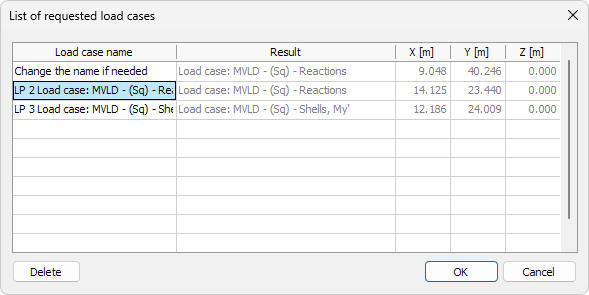
Each row in the table represents one point from which a load case will be generated.
The table contains the following columns:
- Load case name – name used when generating a load case from the selected point
- Result – result value used to generate the load case
- X – global X-coordinate of the point
- Y – global Y-coordinate of the point
- Z – global Z-coordinate of the point
You can:
- edit the Load case name
- remove a point using Delete, which prevents a load case from being generated from that point
Other table values are read-only.
Load case generation
Load cases are not generated immediately.
The actual generation of load cases takes place when you leave the Analysis tab, for example by switching to the Loads tab.
This allows you to review and adjust the selected points before committing to the creation of new load cases.
To read more about the Traffic load tool, see the topic:
User interface ➔ Tab menus ➔ Loads ➔ Traffic load