Get started
To get started, install PREFAB and a compatible PDF viewer.
Install PREFAB
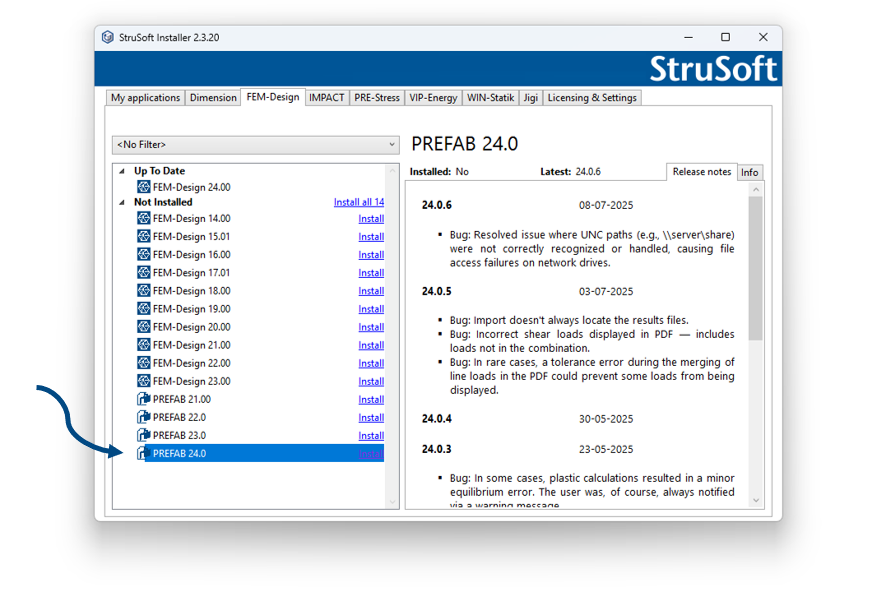
PREFAB is installed through the StruSoft Installer. You can find it under the FEM-Design tab. Get ⧉ strusoft.com/software/strusoft-installer.
PDF viewers
Due to the interactive features of the PDF, it is not compatible with all PDF viewers.
We recommend ⧉ PDF-XChange Editor, as it supports all the interactive features, PDF merging inside the viewer and Excel export from tables.
| Viewer | Interactive support | PDF merge inside viewer** | Recommended | Excel export from tables |
|---|---|---|---|---|
| ⧉ Bluebeam | X | (X)* | - | - |
| ⧉ PDF-XChange Editor | X | X | X | X |
| Google Chrome | - | - | - | - |
| Microsoft Edge | - | - | - | - |
| Adobe Acrobat | X | (X)* | - | (X)*** |
| Foxit | X | (X)* | - | - |
| Itext | X | (X)* | - | - |
* Inserting PDFs into the original PREFAB PDF works, but multiple PREFAB PDFs can't be merged.
** PDF merging is included in PREFAB, and works with multiple PREFAB PDFs and normal PDFs.
*** Manual Ctrl+C, Ctrl+V to copy and insert.