Calculation parameters
Calculation parameters
Calculation parameters tool is used to set the design and verification parameters for masonry wall elements.

When you select the tool, a tool palette opens instead of a dialogue.

The tool palette contains five tools:
- Properties – opens the Calculation parameters dialogue for the selected wall stripe
- Split stripe – splits a wall stripe into two
- Move border – moves the border between two adjacent wall stripes
- Merge stripes – merges two adjacent wall stripes into one
- Reset wall stripes – resets the wall stripes to a uniform width, set with the Max. stripe width field
Calculation parameters dialogue
With the Properties tool, selecting a wall stripe opens the Calculation parameters dialogue for that stripe.
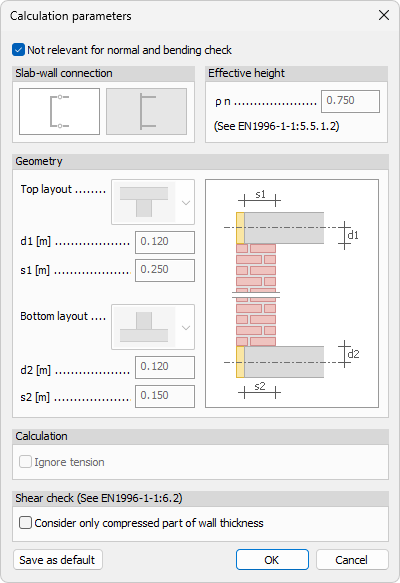
- Not relevant for normal and bending check – checkbox to exclude the stripe from the normal force and bending resistance check
Slab-wall connection
Select the layout that describes how the slab connects to the wall.
Effective height
- ρ n – set the effective height factor (see EN1996-1-1:5.5.1.2)
Geometry
- Top layout – drop-down menu to select the top slab layout
- d1 – set the d1 dimension
- s1 – set the s1 dimension
- Bottom layout – drop-down menu to select the bottom slab layout
- d2 – set the d2 dimension
- s2 – set the s2 dimension
The diagram illustrates the s1, d1, d2, and s2 dimensions on the wall cross-section.
Calculation
- Ignore tension – checkbox to ignore tension in the stripe
Shear check (See EN1996-1-1:6.2)
- Consider only compressed part of wall thickness – checkbox to limit the shear check to the compressed part of the wall thickness