Edit
Edit menu contains tools for basic editing of the model.
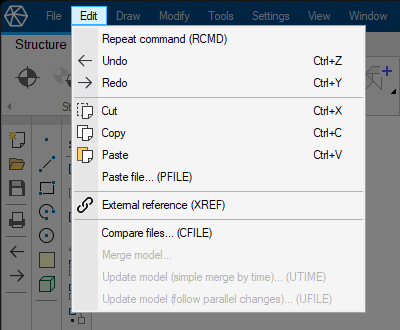
- Repeat command – repeat the last command. Both written (in the command line) and selected (with mouse or keyboard shortcuts) commands are repeated
- Undo and Redo – similar to other software, undo and redo a command
- Cut and Copy – cut or copy any model element. You first need to activate the relevant menu item and then select the elements you want to cut or copy. You also need to define a base point in the model view
- Paste – paste the previously cut or copied model elements by their base point
- Paste file... – open a new dialogue window where you can select an existing model file (supports different formats). You can then paste that model file into the current project using the origin point of the selected model
- ↘ External reference – paste CAD files as a reference into the current project
- Compare files – compare two files. You can see what was created, modified, deleted and unchanged
- Merge model
- Update model (simple merge by time)
- Merge model (follow parallel changes)