File
File menu contains functions for file and project management like opening, saving, exporting and printing.
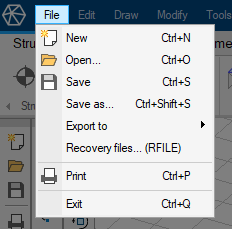
- New – start a new project in the current module (3D Structure, Plate, Steel Joint, Section Editor or Parametric model)
- Open... – open a project in a supported file format. Not every module allows opening of all formats
- Save – save the current project
- Save as... – save the current project with a different name or in a different format
- ↘ Export to – export to different formats or send to integrated software
- ↘ Recovery files... – recover a project from a timesaved file
- Print – open a printing dialogue
- Exit – close the software