Export data
There are multiple export options within PREFAB for exporting to other file formats. This can be done in the viewer (Display of models) or the dedicated tab (Export to other file formats).
The options are currently dependent on what type of calculation has been run.
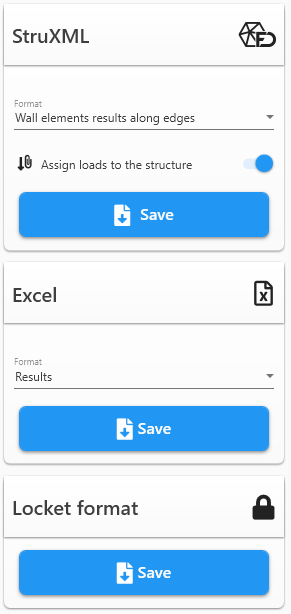
Exporting via: Export to other file formats
Exporting using the Export to other file formats tab gives you the full list of options available for your calculation:
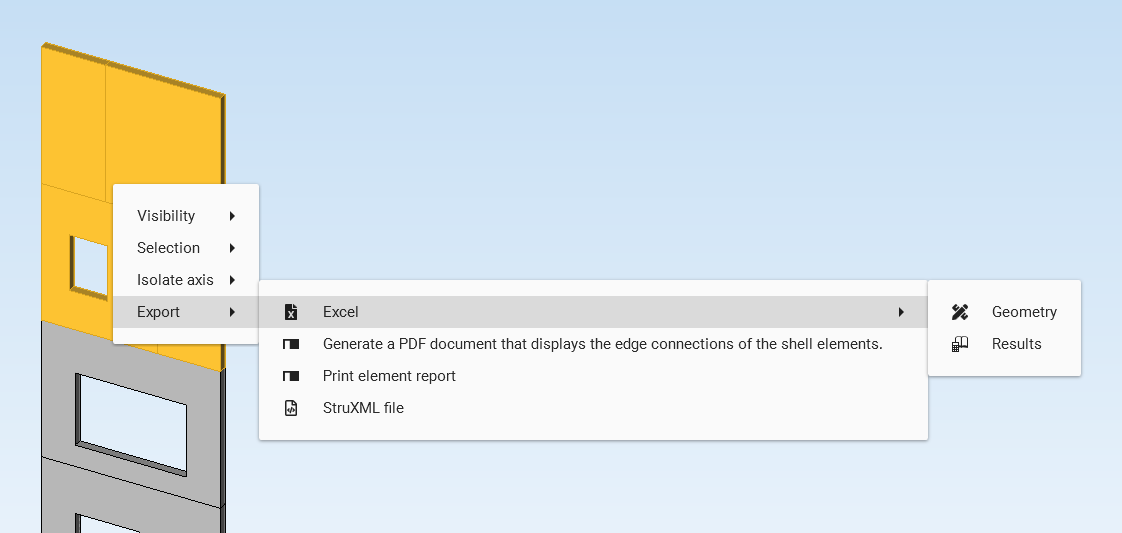
Exporting via: Display of models
Inside the Display of models, you can manually select elements, right-click and then choose the export type you want:
Export options
The export chapter is divided into the following parts:
-
↘ The interactive PDF report – the primary deliverable with floor plans, elevations and bar element tables
-
↘ Export to FEM-Design – walls, plates, custom selection or reactions as StruXML
-
↘ Export to Excel – results or geometry data
-
↘ Export locked file – lock the project information before sharing
-
↘ Merge PDF – combine interactive PDFs while keeping their features