3D Rotation
Use the 3D Rotation tool to change the 3D viewing angle of the model. The angle is always relative to the global system plane, not the UCS.

When you select the 3D Rotation tool from the menu, a new dialogue window opens.
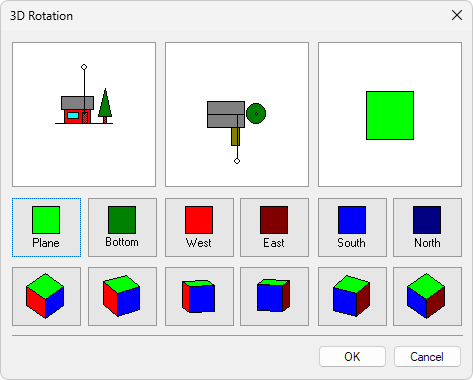
The dialogue window contains 3 main sections:
- the top row is for manual definition and the final result display
- the middle row is for predefined 2D angles
- the bottom row is for predefined 3D angles
Manual definition of viewing angle

With the first 2 images, you can manually define the 3D viewing angle by dragging the white dot with the mouse. The third image will always show the end result.
Predefined 2D angles
These functions are for predefined 2D style viewing angles. The views will still be in 3D space. Every time you select one of the predefined angles, the images in the manual definition row will update to show the final result.
| Description | |
|---|---|
 | Use Plane function to set the view to plan view (view from the top). |
 | Use Bottom function to set the viewing angle to view from the bottom. |
 | Use West function to set the viewing angle to view from the west (view from left). |
 | Use East function to set the viewing angle to view from the east (view from right). |
 | Use South function to set the viewing angle to view from the south (view from front). |
 | Use North function to set the viewing angle to view from the north (view from back). |
Predefined 3D angles
These functions are for predefined 3D viewing angles. Every time you select one of the predefined angles, the images in the manual definition row will update to show the final result.
| Description | |
|---|---|
 | Use Top SW function to set the viewing angle to view from the top southwest (view from the top left front). |
 | Use Top SSW function to set the viewing angle to view from the top south-southwest (view from the top left front, turned more front and lower). |
 | Use Top StW function to set the viewing angle to view from the top south toward west (view mainly from front toward left). |
 | Use Top StE function to set the viewing angle to view from the top south toward east (view mainly from front toward right). |
 | Use Top SSE function to set the viewing angle to view from the top south-southeast (view from the top right front, turned more front and lower). |
 | Use Top SE function to set the viewing angle to view from the top southeast (view from the top right front). |